
See exactly what Dori did and why
Complete transparency with an immutable audit trail and human-in-the-loop approvals before Dori takes any high-risk action.
For: business leaders who want full visibility into what an AI assistant does on their behalf
If you’re hesitant about AI taking automated actions behind the scenes and want 100% visibility and control — this is for you.
Autonomous AI tools often feel like a black box. Business leaders worry that an AI assistant might silently send an email, overwrite a client contract, or alter records without permission. Without clear logging, you’re left guessing why a file was modified or what an automation did while you were away — and it only takes one unreviewed action touching the wrong client file to lose your confidence in the whole system.
How the risk check works
Dori enforces strict human-in-the-loop risk controls. Low-risk background tasks (indexing notes, generating summaries, tag matching) run smoothly in the background. High-risk operations (sending messages, modifying sensitive files) generate a pending approval item in your Inbox. Every execution — successful or blocked — is recorded in an immutable Audit Trail.
What’s actually driving this, and what it costs
Audit logging, permission verification, and approval queue management are handled locally by Dori’s background engine, at zero API cost. Generating summaries of audit traces is the part that uses your connected AI provider.
Transparency & Approval Controls
Dori balances automation with safety:
- Immutable Audit Trail: View a complete chronological log of every action Dori executed, which files were touched, and which AI provider processed the request.
- Inbox Approvals: High-risk actions wait in your Inbox as pending approvals. You can inspect the proposed action, click Approve or Reject, and Dori proceeds accordingly.
- First-Responder Idempotency: If an approval item is resolved on desktop or mobile, it resolves across all surfaces simultaneously so you never approve the same item twice.
How to inspect the Audit Trail
- Open the What Dori Did page — press / to open the Command Palette and search for it (it isn’t in the main sidebar).
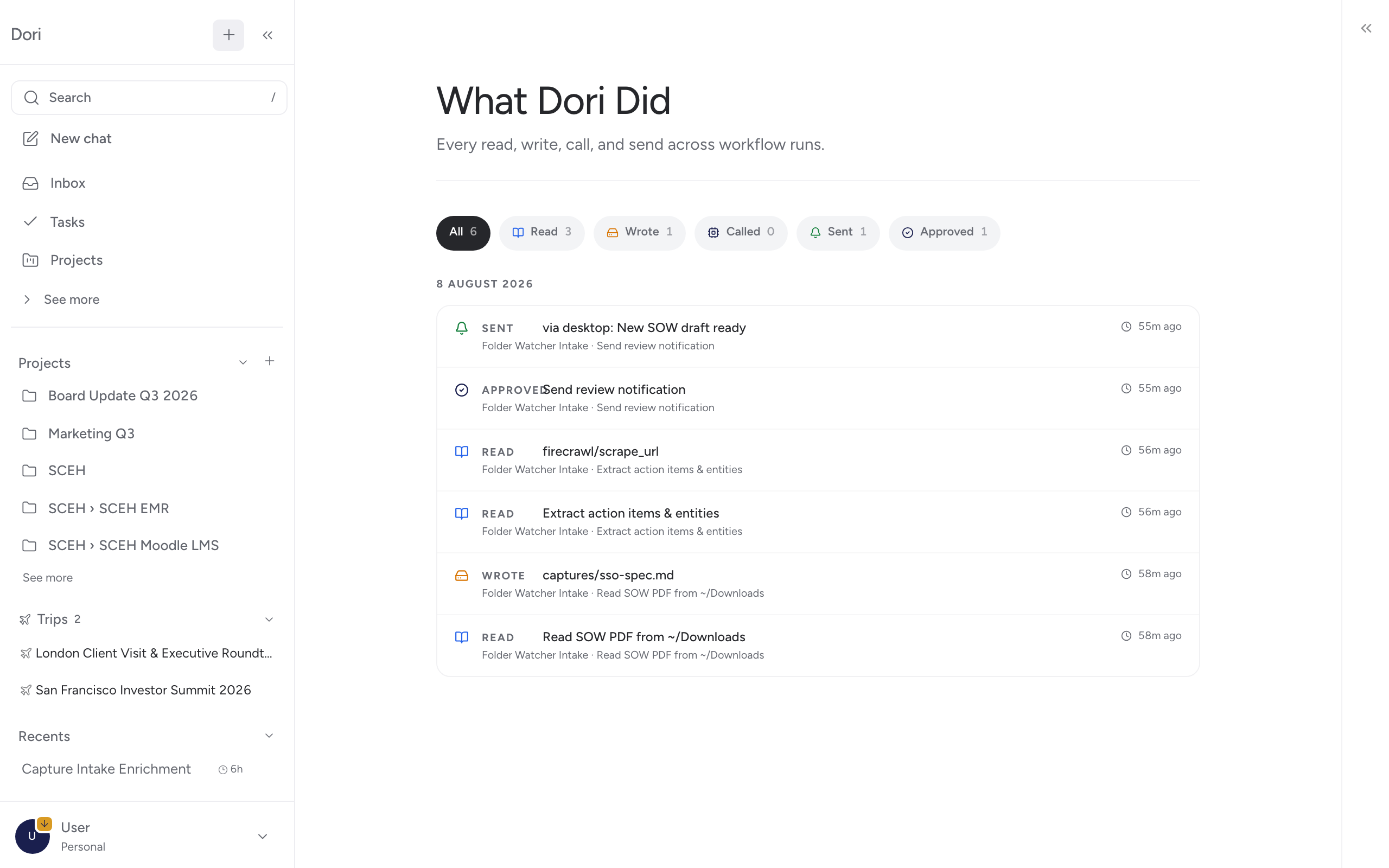
- Browse recent events, grouped by day, filtered by kind: Read, Write, Call, Send, or Approve.
- Click any entry to see the full execution trace — including source files, input parameters, and exact timestamps.
Why this builds confidence for business teams
- No Hidden Mutations: You can verify every edit Dori makes to your Markdown vault.
- Complete Accountability: Clear evidence of what ran while you were out of the office.
- Total Operational Control: Configure risk thresholds per tool or integration so you remain in complete command.
Go further
- Want to review pending approvals? Open your Inbox in Dori Desktop.
- Connecting external tools? Learn how Connect your tools with MCP enforces per-tool permissions.
- Reviewing automated rules? See Audit trail for technical details.