
Audit trail
Every read, write, call, and send Dori has made, logged to an immutable trail you can inspect — nothing happens without a record.
The audit trail is a record of what Dori actually did — every read, write, call, and send, grouped by the workflow run that triggered it. If you want to know why something happened, this is where to check.
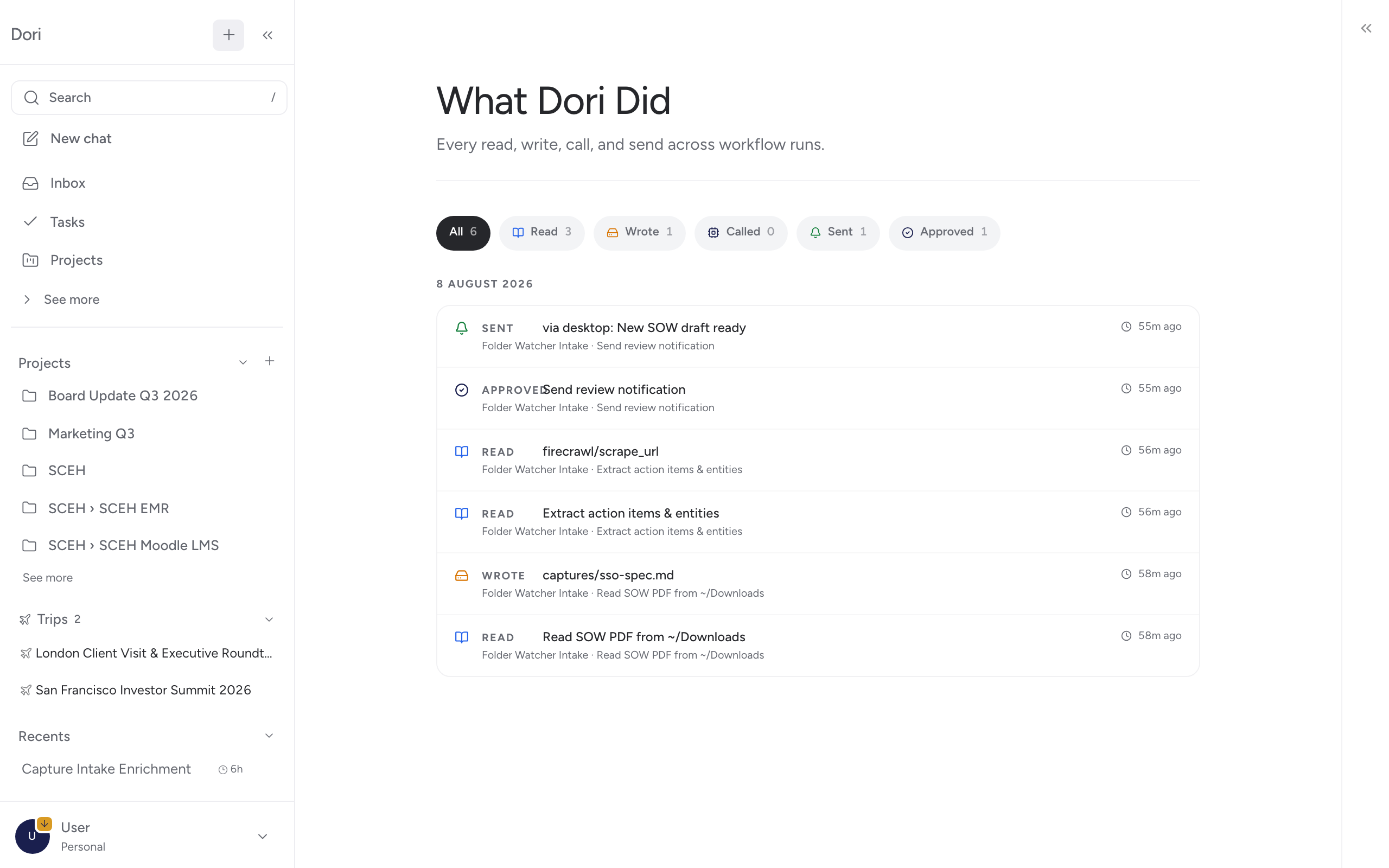
What’s recorded
Each event is one of:
- Read — Dori read something.
- Write — Dori wrote a vault file.
- Call — Dori called an external MCP tool.
- Send — Dori sent a message somewhere.
- Approve — an approval step in a workflow.
Drilling into a workflow run shows step-by-step detail: which vault files were written, which MCP tools were called and with what result, and any notifications that went out.
Filtering
You can filter the trail by event kind to answer a specific question — for example, filter to Send to check exactly what Dori sent out, or Call to see which external tools it actually reached.
Where to find it
Audit trail isn’t in the main sidebar — open it from the command palette (press / and type “Audit”).
Why it matters
Automations and MCP connections mean Dori acts somewhat independently. The audit trail is how you verify that independence is staying inside the bounds you expect, without having to guess.